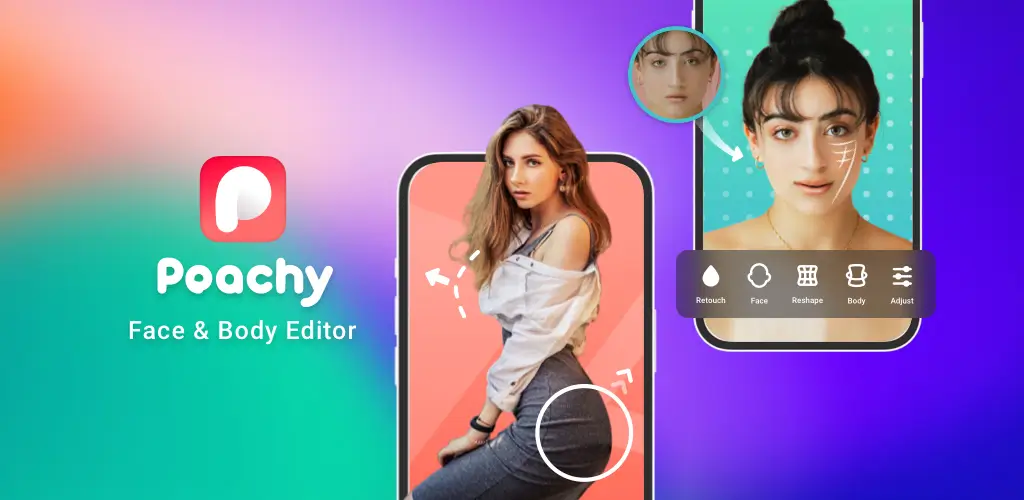
Looking for the best photo retouching app? Read our comprehensive Peachy app review covering features, pricing, pros, cons, and the final verdict on this top-tier body and face editor.
In the digital age, achieving the perfect selfie or social media photo often requires a little digital enhancement. Enter Peachy: Face App & Body Editor, a highly popular photo retouching application designed to help users refine their facial features and body proportions with just a few taps. But does it live up to the hype?
In this comprehensive Peachy app review, we will dive deep into its features, user interface, pricing, and overall performance to help you decide if it is the right photo editing tool for you.
Key Features of Peachy App
Peachy has carved a niche for itself by focusing specifically on body reshaping and facial retouching, moving beyond standard filters to offer granular control over your photos. Here is a breakdown of its core features:
1. Advanced Body Editor
The standout feature of Peachy is its robust body editing suite. It allows users to subtly or dramatically alter their physical appearance in photos.
- Slimming and Reshaping: Easily adjust the width of your waist, arms, legs, and face.
- Height Adjustment: A unique tool that lets you appear taller or shorter without distorting the background.
- Muscle Enhancement: Add definition to your abs, arms, and chest for a more toned look.
- Background Protection: Advanced algorithms attempt to keep straight lines and backgrounds intact while you reshape the subject.
2. Professional Face Retouching
Peachy acts as a digital makeup artist and dermatologist combined.
- Skin Smoothing: Erase blemishes, acne, wrinkles, and pores instantly.
- Face Reshaping: Adjust the size of your eyes, nose, lips, and jawline.
- Digital Makeup: Add virtual blush, lip color, and eye makeup to enhance your natural features.
- Teeth and Eye Whitening: Brighten your smile and make your eyes pop with specialized whitening tools.
3. AI-Powered Enhancements
Keeping up with modern trends, Peachy has integrated several AI tools to elevate your editing game.
- AI Background Replacement: Blur, change, or generate entirely new AI backgrounds for your portraits.
- AI Avatars: Generate stylized, professional, or artistic AI avatars from your selfies.
- Smart Enhance: One-tap AI adjustments for lighting, contrast, and color balance.
4. Hair and Skin Tone Editing
Beyond basic retouching, Peachy allows you to change your hair color, add volume, or even change your hairstyle. You can also adjust your skin tone, add a sun-kissed tan, or correct uneven skin pigmentation.
User Interface and Ease of Use
One of the biggest strengths of the Peachy app is its intuitive user interface. The developers have designed the app to be accessible for beginners while offering enough depth for advanced users.
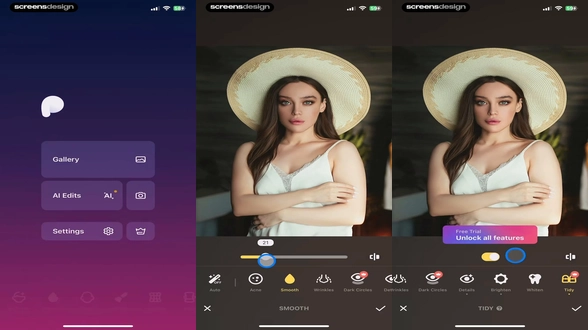
The editing tools are categorized neatly at the bottom of the screen. When you select a tool, such as “Waist” or “Acne,” a simple slider appears, allowing you to control the intensity of the effect. The real-time preview ensures you can see the changes as you make them, preventing the “over-editing” trap that many users fall into with other apps. Furthermore, the “Undo” and “Redo” buttons are easily accessible, making the trial-and-error process seamless.
Pros and Cons of Peachy
To give you a balanced perspective, here are the advantages and disadvantages of using the Peachy photo editor.
The Pros
- Natural-Looking Results: The algorithms are highly refined, ensuring that edited photos look realistic rather than plastic or overly distorted.
- Comprehensive Toolset: Combines body editing, face retouching, and AI tools in one single application.
- User-Friendly Interface: Clean, clutter-free design with easy-to-use sliders.
- Background Protection: Excellent at maintaining the integrity of background lines (like walls and doorframes) during body reshaping.
- Regular Updates: The developers frequently add new features, filters, and AI capabilities.
The Cons
- Aggressive Paywall: Many of the best features, including advanced AI tools and premium filters, are locked behind the Peachy Premium subscription.
- Free Version Limitations: The free version may include a watermark on exported photos and limits the resolution of saved images.
- Background Distortion on Complex Images: While the background protection is good, highly complex or cluttered backgrounds can still warp if you use the body reshaping tools too aggressively.
Pricing and Subscription Model
Peachy operates on a freemium model. You can download the app and use basic tools for free, but to unlock the full potential of the app, a subscription is required.
- Free Version: Grants access to basic skin smoothing, minor body reshaping, and standard filters. However, exports may be watermarked, and premium tools are locked.
- Peachy Premium (Pro): Unlocks all advanced body editing tools, AI features, premium filters, and removes any watermarks. It also allows for high-resolution exports.
Note: Pricing for Peachy Premium varies by region and is typically offered in weekly, monthly, or yearly billing cycles. The yearly plan usually offers the best value. Users can often start with a free trial before committing to a paid subscription.
Final Verdict: Is Peachy Worth It?
Peachy: Face App & Body Editor is undeniably one of the most powerful and user-friendly retouching apps available on the market today. If your primary goal is to perfect your selfies, enhance your portraits for social media, or subtly adjust your body proportions without spending hours learning complex software like Photoshop, Peachy is an excellent choice.
While the aggressive push towards its Premium subscription can be slightly frustrating for free users, the quality of the editing tools justifies the cost for those who take their social media presence seriously. The seamless blend of traditional liquify tools with modern AI enhancements makes Peachy a must-have in your digital editing arsenal.
Rating: 4.5/5
Frequently Asked Questions (FAQs)
Is the Peachy app free to use?
Yes, Peachy is free to download and offers a basic set of editing tools for free. However, advanced features, AI tools, and high-resolution exports require a Peachy Premium subscription.
Does Peachy leave a watermark on my photos?
The free version of the app may apply a subtle watermark to your exported images. Upgrading to Peachy Premium removes all watermarks.
Can Peachy edit group photos?
Yes, Peachy allows you to select and edit multiple people in a single group photo. You can isolate individuals to apply specific body or face retouching tools to each person.
Is Peachy safe and secure to use?
Yes, Peachy is a legitimate and safe application available on official app stores. Your photos are processed locally on your device or via secure servers, and the app does not share your private images without your consent. Always ensure you download the app from the official Apple App Store or Google Play Store.
Download from Google Play for Android:
Download for Android, click here
Download from App Store for iPhone:
Download for iPhone, click here