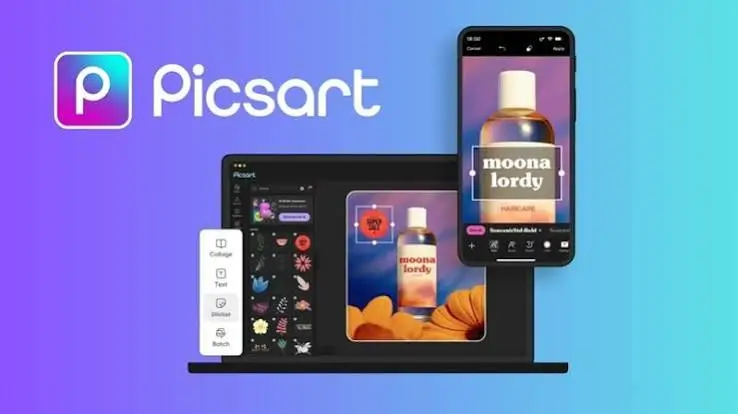
In the rapidly evolving world of mobile content creation, finding an all-in-one editing suite can be challenging. Enter Picsart AI Photo Editor, Video, a powerhouse application that has transformed from a simple photo filter app into a comprehensive, AI-driven creative studio. Whether you are a social media influencer, a small business owner, or a casual user looking to enhance your memories, Picsart promises to deliver.
But does it live up to the hype? In this comprehensive Picsart review, we will dive deep into its features, user interface, pricing, and overall performance to help you decide if it is the right editing tool for your needs.
Key Features: What Makes Picsart Stand Out?
Picsart is no longer just about applying filters. It has integrated advanced artificial intelligence and professional-grade tools into a single mobile platform. Here is a breakdown of its core capabilities:
1. Advanced AI Photo Editing
The integration of AI is where Picsart truly shines. The app offers a suite of AI tools that save hours of manual editing:
- AI Background Removal: Instantly erase or swap backgrounds with pixel-perfect accuracy.
- AI Enhance: Upscale low-resolution images and fix blurry photos with a single tap.
- AI Replace & Remove: Unwanted objects or people can be removed seamlessly, or replaced with AI-generated elements.
- Text-to-Image: Generate unique artwork and backgrounds from simple text prompts.
2. Professional Photo Editing Tools
For those who want granular control, Picsart offers desktop-level editing features:
- Layers and Masks: Create complex compositions by stacking images and using masks to blend them perfectly.
- Retouching Tools: Smooth skin, whiten teeth, reshape facial features, and remove blemishes effortlessly.
- Color Grading: Adjust HSL (Hue, Saturation, Luminance), apply curves, and use professional LUTs to achieve cinematic color profiles.
- Extensive Sticker and Text Library: Add custom typography, millions of user-generated stickers, and overlays to give your photos a unique flair.
3. Dynamic Video Editing
Picsart is not just for static images; its video editor is robust and highly intuitive:
- Multi-Track Editing: Layer multiple video clips, audio tracks, and text overlays.
- Speed Ramping and Keyframes: Create smooth slow-motion effects and animate text or stickers across the screen using custom keyframes.
- Video Effects and Filters: Apply trendy visual effects, glitches, and cinematic color grades to your video footage.
- Audio Enhancement: Extract audio, add voiceovers, and sync your clips to a massive library of royalty-free music.
User Interface and Experience

One of Picsart’s strongest selling points is its user-friendly interface. Despite packing hundreds of features, the app avoids feeling overwhelmingly cluttered. The home screen is neatly categorized into “Photo,” “Video,” “AI Tools,” and “Collage,” allowing users to navigate directly to what they need.
The editing workspace is highly intuitive, with tools grouped logically at the bottom and side menus. While the sheer number of options might require a slight learning curve for absolute beginners, the app includes helpful tooltips and templates to guide new users.
Pricing: Picsart Free vs. Picsart Premium (Gold)
Picsart operates on a freemium model. While the free version is highly functional, the premium subscription unlocks the app’s true potential.
The Free Version
The free tier provides access to basic editing tools, a selection of filters, and standard cropping/resizing features. However, it comes with notable limitations:
- Frequent pop-up ads that can interrupt the creative flow.
- Watermarks on certain premium assets and AI generations.
- Limited access to advanced AI tools and premium templates.
Picsart Premium (Gold)
Upgrading to Picsart Premium is a game-changer for serious creators. The subscription offers:
- Ad-Free Experience: Uninterrupted editing sessions.
- Full AI Access: Unlimited use of AI background removal, AI enhance, and AI generation tools.
- Premium Assets: Access to exclusive stickers, fonts, templates, and high-end video effects.
- No Watermarks: Export your creations in pristine quality without any branding.
Note: Picsart frequently offers discounted annual plans, which provide the best value for long-term users.
Pros and Cons of Picsart
Pros
- All-in-One Solution: Combines photo editing, video editing, and graphic design in one app.
- Cutting-Edge AI Integration: AI tools are fast, accurate, and highly creative.
- User-Friendly Interface: Intuitive design makes complex editing accessible to everyone.
- Cross-Platform Sync: Available on iOS, Android, and Web, with cloud syncing for premium users.
- Massive Asset Library: Millions of stickers, templates, and fonts.
Cons
- Aggressive Ads in Free Version: The free experience is heavily interrupted by advertisements.
- Resource Heavy: The app requires a significant amount of storage and can lag on older devices.
- Premium Paywall: Many of the best features and AI tools are locked behind a relatively expensive subscription.
Who is Picsart For?
Picsart is incredibly versatile, making it suitable for a wide range of users:
- Social Media Creators: Perfect for designing Instagram stories, YouTube thumbnails, and TikTok videos.
- Small Business Owners: Ideal for creating marketing materials, product mockups, and promotional graphics without needing a graphic designer.
- Casual Users: Great for touch-ups, removing photobombers, and adding fun stickers to personal photos.
Final Verdict: Is Picsart Worth It?
Picsart AI Photo Editor, Video has rightfully earned its place as one of the top-tier mobile editing applications on the market. Its seamless blend of traditional editing tools and next-generation AI capabilities makes it a standout choice in a crowded app store.
If you are willing to invest in the Picsart Premium subscription, the app transforms into an indispensable creative companion that can rival desktop software in terms of versatility. However, if you are strictly using the free version, be prepared to navigate through ads and limited features.
Ultimately, whether you are looking to quickly retouch a selfie or produce a complex, AI-enhanced video masterpiece, Picsart provides the tools you need to bring your creative vision to life.
Download from Google Play for Android:
Download for Android, click here
Download from App Store for iPhone:
Download for iPhone, click here