In an era where smartphones store our most sensitive personal and financial data, robust cybersecurity is no longer optional. If you are looking for reliable protection for your Android device, you have likely come across AVG Mobile Security. But does it live up to the hype?
In this comprehensive AVG Mobile Security review, we will explore its core features, performance, pricing, and overall value to help you decide if it is the right mobile security app for your needs.
Key Features of AVG Mobile Security
AVG Antivirus for Android is packed with tools designed to protect your device from malware, secure your privacy, and optimize performance. Here is a breakdown of its standout features:
1. Real-Time Malware Protection
The core of any antivirus app is its ability to detect and neutralize threats. AVG Mobile Security utilizes a powerful cloud-based scanning engine to identify and block malicious apps, phishing links, and hidden malware in real-time. It also performs automatic scans of downloaded files and installed applications.
2. Advanced Anti-Theft Tools
Losing your phone is a stressful experience, but AVG’s anti-theft features can help you recover it or protect your data. Key functionalities include:
- Locate: Track your device on a map using GPS.
- Lock: Remotely lock your screen and display a custom message with a contact number.
- Wipe: Completely erase your personal data if the device is unrecoverable.
- Camera Trap: Takes a stealthy photo of anyone who enters the wrong unlock PIN.
3. App Lock and Privacy Advisor
Protect your most sensitive applications (like banking, social media, or photo galleries) with a secondary PIN, pattern, or fingerprint lock. Additionally, the Privacy Advisor monitors app permissions, alerting you if an app is accessing your camera, microphone, or contacts without a valid reason.
4. Wi-Fi Security and Network Scanning
When connecting to public Wi-Fi, your data can be vulnerable. AVG’s Wi-Fi security feature scans your network for vulnerabilities and warns you if you are connected to an unsecured or compromised router.
5. Device Optimization (RAM Booster & Junk Cleaner)
While primarily a security app, AVG includes tools to keep your phone running smoothly. The RAM Booster frees up memory to speed up your device, while the Junk Cleaner identifies and deletes hidden cache files, residual APKs, and obsolete data to free up storage space.
User Interface and Performance
Design and Usability
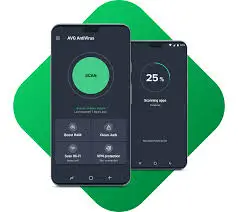
The user interface (UI) of AVG Mobile Security is clean, intuitive, and highly user-friendly. The main dashboard provides a quick overview of your device’s security status with a simple “Scan” button. Navigating through the different features is seamless, making it an excellent choice for both tech-savvy users and beginners.
Performance Impact
A common concern with mobile antivirus apps is battery drain and system slowdowns. AVG Mobile Security is highly optimized. Background scanning is lightweight, and it rarely causes noticeable battery depletion. The real-time protection runs efficiently without interfering with heavy tasks like gaming or video streaming.
Pros and Cons of AVG Mobile Security
To give you a balanced perspective, here are the main advantages and disadvantages of the app.
The Pros
- Excellent Malware Detection: Highly effective at identifying and blocking Android threats.
- User-Friendly Interface: Clean design makes it easy for anyone to navigate.
- Robust Anti-Theft Features: The camera trap and remote wipe features are incredibly useful.
- Comprehensive Free Version: The free tier offers a surprising amount of core security features.
- Privacy Controls: The App Lock and Privacy Advisor give you total control over your data.
The Cons
- Ads in the Free Version: The free version is supported by frequent in-app advertisements, which can be annoying.
- Premium Features Paywalled: Essential features like advanced anti-theft and ad-free usage require a premium subscription.
- Redundant Optimization Tools: Features like the RAM booster are largely unnecessary on modern Android devices with ample memory.
Pricing and Plans: Free vs. Premium
AVG Mobile Security operates on a freemium model, allowing you to download and use the basic version for free, with the option to upgrade.
- AVG Mobile Security Free: Includes real-time malware scanning, app lock, basic anti-theft (locate and lock), and Wi-Fi security. However, it includes ads and limits some advanced remote wipe capabilities.
- AVG Mobile Security Premium: Upgrading removes all ads, unlocks advanced anti-theft features (like the camera trap and remote wipe), provides premium customer support, and includes identity protection alerts. The premium subscription is highly affordable, often costing less than $20 per year, making it a cost-effective investment for comprehensive mobile security.
Final Verdict: Is AVG Mobile Security Worth It?
After putting it to the test, AVG Mobile Security proves to be a top-tier Android antivirus app. It strikes an excellent balance between robust cybersecurity, privacy management, and device optimization.
If you are looking for a free mobile security app to handle basic malware protection and app locking, the free version is more than capable. However, if you want a completely ad-free experience and need advanced anti-theft tools like remote wiping and camera traps, upgrading to AVG Premium is highly recommended.
Who is it for? It is ideal for everyday Android users who want peace of mind without compromising their device’s performance. Whether you frequently use public Wi-Fi, download apps from third-party stores, or simply want to keep your personal photos locked away, AVG Mobile Security delivers reliable, all-around protection.
Overall Rating: 4.5 / 5 Stars
Download from Google Play for Android:
Download for Android, click here
Download from App Store for iPhone:
Download for iPhone, click here