
The X app, formerly known as Twitter, has transformed from a simple microblogging network into a multifaceted social platform built for real-time conversation, creator monetization, and multimedia engagement. In this comprehensive X app review, we break down its latest features, subscription tiers, user experience, privacy controls, and whether it remains a must-have app in 2026.
What Is the X App?
Originally launched as a text-based social network for quick updates, the platform rebranded to X with the vision of becoming an “everything app.” Today, it blends short-form posts, long-form articles, live audio, video streaming, community forums, and integrated creator tools. The 2026 iteration continues to push toward a unified digital space where users can consume, create, and monetize content without leaving the app.
Key Features of the X App in 2026
- Smart Feed & AI Timeline: Algorithmic and chronological feed options with AI-driven content ranking, trend filtering, and personalized topic suggestions.
- Multimedia Posts: Support for high-resolution images, short videos, long-form video uploads, interactive polls, and threaded discussions.
- X Spaces: Live audio rooms with host controls, ticketed access, recording playback, and integrated chat.
- Communities & Topics: Niche-focused groups with moderated feeds, custom rules, and dedicated discovery tabs.
- Creator & Monetization Tools: Ad revenue sharing, subscriptions, tipping, paid newsletters, and affiliate-style product tagging.
- Cross-Platform Sync: Seamless experience across iOS, Android, web, and smart TV apps with cloud-saved drafts and watch history.
- Advanced Search & Filters: Boolean search, media-only filters, date ranges, and saved search folders for power users.
User Experience & Interface
The X app interface prioritizes speed and scrollability. The home screen centers around the main feed, with a bottom navigation bar for search, notifications, messages, and profile access. Dark mode is fully optimized, and custom accent colors allow personalization.
Recent updates have streamlined the composer, added inline media previews, and reduced intrusive UI elements. However, ad placement and promotional prompts can occasionally disrupt the browsing flow. Power users appreciate the customizable tabs, keyboard shortcuts on desktop, and bulk moderation tools. New users may find the algorithm feed initially overwhelming, but switching to chronological or topic-based views helps control content exposure.
Performance remains strong on mid-range devices, with faster video buffering, reduced background data usage, and improved offline caching for drafts and read posts.
Subscription Plans & Monetization
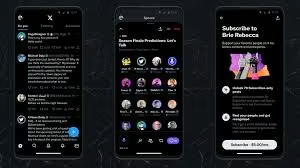
X offers a tiered subscription model designed for both consumers and creators:
- X Basic: Entry-level paid tier with verification badge, post editing, limited ad reduction, and slightly higher media upload limits.
- X Premium: Full feature set including priority ranking in replies and search, longer video uploads, reduced ads, creator analytics, and access to exclusive Spaces.
- X Premium+: Ad-free experience across the entire app, highest upload limits, early access to new features, and enhanced profile customization.
Creators can enroll in revenue sharing for video views and ads displayed on their posts. The platform also supports paid subscriptions, digital tips, and integrated commerce links. While the free tier remains fully functional, frequent users and content creators often find the paid tiers justify the monthly cost through visibility and monetization tools.
Security, Privacy & Content Moderation
X provides standard security features including two-factor authentication, login alerts, and session management. Privacy controls allow users to restrict message requests, hide likes, limit who can tag or reply, and approve follower requests.
Content moderation in 2026 relies on a hybrid system: automated AI filters flag harmful content, while community reporting and user-defined block/mute lists give individuals direct control over their experience. The platform offers granular visibility settings for posts, archive exports, and data download options. Some users note that policy enforcement varies by region and topic, making custom filters and mute lists essential for a clean feed.
Pros & Cons
Pros:
- Real-time updates and global trending conversations
- Flexible content formats (text, video, audio, long-form)
- Built-in creator monetization and revenue sharing
- AI-powered feed customization and search filters
- Cross-platform sync and consistent mobile performance
- Tiered subscription model with tangible perks
Cons:
- Ad frequency and promotional prompts can feel intrusive
- Moderation policies may appear inconsistent across topics
- Algorithm shifts occasionally affect content reach
- Premium features require ongoing subscription costs
- Steeper learning curve for advanced tools and community management
- Occasional server slowdowns during major global events
Final Verdict: Is the X App Worth Using in 2026?
The X app has successfully evolved into a versatile social platform that caters to casual scrollers, journalists, businesses, and digital creators. Its strength lies in real-time engagement, multimedia flexibility, and integrated monetization tools. While ad density and moderation variability remain valid concerns, the platform’s customization options, subscription tiers, and continuous feature updates make it highly adaptable to different user needs.
If you value live conversations, content creation, or staying ahead of breaking trends, the X app remains a top-tier social media tool in 2026. Free users can still access core features, while creators and power users will likely benefit from a Premium subscription.
Frequently Asked Questions
Is the X app free to use?
Yes. The core experience, including posting, browsing, messaging, and joining Spaces, is completely free. Paid tiers add visibility, ad reduction, and advanced tools.
What’s the difference between X and Twitter?
X is the official rebrand and upgraded version of Twitter. It retains core functionality while adding long-form content, video monetization, subscription tiers, and an expanded feature set.
Does X Premium remove all ads?
Premium+ removes most in-feed ads. Basic and Premium reduce ad frequency but do not eliminate them entirely. Some promoted posts and platform banners may still appear.
How does X protect user privacy?
Users can control profile visibility, restrict messages, hide engagement metrics, enable two-factor authentication, and manage data downloads. Privacy settings are accessible from the app’s security center.
Can creators earn money on the X app?
Yes. Eligible creators can earn through ad revenue sharing, paid subscriptions, digital tips, ticketed Spaces, and integrated commerce features. Requirements vary by region and account standing.
Download from Google Play for Android:
Download for Android, click here
Download from App Store for iPhone:
Download for iPhone, click here