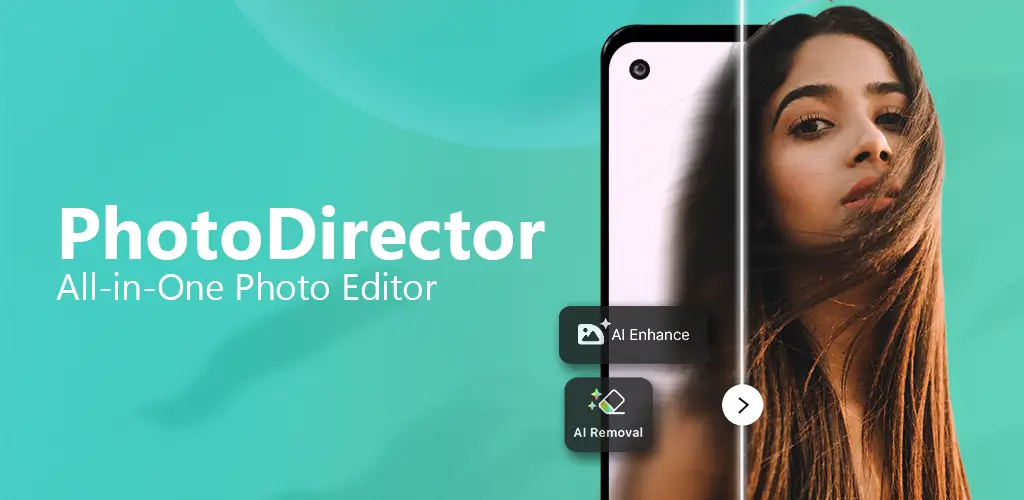
In the rapidly evolving world of mobile photography, artificial intelligence has completely transformed how we edit, enhance, and create content. Among the myriad of apps available on the market, PhotoDirector: AI Photo Editor has emerged as a heavyweight contender. Developed by CyberLink, a veteran in multimedia software, PhotoDirector has transitioned from a standard photo editor to a powerhouse of generative AI tools.
Whether you are a social media influencer, a digital marketer, or a photography enthusiast, this comprehensive review will dive deep into PhotoDirector’s features, performance, and overall value for both Android and iOS users.
What is PhotoDirector: AI Photo Editor?
PhotoDirector is an all-in-one photo and video editing application designed for mobile devices. While it started as a robust alternative to desktop editing software, its recent integration of advanced AI capabilities has positioned it as a market leader. The app allows users to perform complex edits, remove unwanted objects, change backgrounds, and even generate AI art, all from their smartphones.
Key Features: Why PhotoDirector Stands Out
To understand why PhotoDirector is highly rated on both the Google Play Store and Apple App Store, we need to explore its core features.
1. Next-Generation AI Photo Editing Tools
The standout selling point of PhotoDirector is its extensive suite of AI-driven features:
- AI Object Removal: Instantly erase unwanted people, objects, or blemishes from your photos. The AI seamlessly fills in the background, saving you from complex cloning tasks.
- AI Sky Replacement: Change a gloomy, overcast sky into a vibrant sunset or a starry night with a single tap. The AI automatically adjusts the lighting and color grading of the foreground to match the new sky.
- AI Anime & Art Styles: Transform your standard selfies or landscapes into stunning anime characters, oil paintings, or sketches using advanced neural networks.
- AI Avatar & Profile Pictures: Generate unique, stylized avatars for your social media profiles using just a few reference photos.
- AI Enhance: Automatically fix lighting, color balance, and sharpness in poorly lit or blurry images with one click.
2. Professional Photo Editing Essentials
Beyond the flashy AI tools, PhotoDirector doesn’t skimp on the basics. It offers a comprehensive set of manual editing tools:
- Color Grading: Advanced HSL (Hue, Saturation, Luminance) adjustments, color curves, and temperature/tint sliders.
- Selective Adjustments: Use radial and linear gradients to edit specific parts of an image without affecting the rest.
- Layer Management: Add multiple layers of photos, text, and stickers, and adjust their blending modes and opacity.
- RAW Support: Edit high-quality RAW files directly from your DSLR or mirrorless camera.
3. Capabilities Beyond Photos: Video Editing
PhotoDirector is not just for static images. It includes a robust video editor that supports:
- 4K Video Export: Edit and export high-resolution videos without losing quality.
- Video Effects & Transitions: Apply cinematic transitions, speed ramping, and visual effects.
- Audio Editing: Add background music, voiceovers, and sound effects, with tools to adjust audio fade and volume.
4. Design and Social Media Templates
For content creators, the app includes a vast library of pre-designed templates. You can quickly create Instagram stories, YouTube thumbnails, TikTok videos, and Facebook posts using customizable text overlays, animated stickers, and trendy fonts.
User Interface and Experience (UI/UX)
A powerful app is useless if it is difficult to navigate. Fortunately, PhotoDirector boasts a highly intuitive, user-friendly interface.
- Clean Layout: The home screen categorizes tools logically, separating AI features, basic edits, and design templates.
- Ease of Use: Beginners can rely on the “One-Tap Enhance” and AI presets, while advanced users can easily access the manual sliders and layer panels.
- Performance: On both iOS and Android, the app runs smoothly. However, because it is packed with features, it can be slightly heavy on device resources. Older Android devices might experience minor lag when rendering complex AI effects or 4K videos, while iOS devices generally handle the workload flawlessly due to hardware optimization.
PhotoDirector for Android vs. iOS
While the core feature set is identical across both platforms, there are minor differences in the user experience:
- iOS Version: Tends to have slightly better optimization and faster rendering times, especially when using heavy AI generation features. The UI also adheres strictly to Apple’s design guidelines, feeling very native.
- Android Version: Offers excellent flexibility and integrates well with Android’s file management system. However, users with mid-range or older Android phones may need to clear background apps to ensure smooth performance during heavy editing sessions.
Pros and Cons of PhotoDirector
Pros:
- Incredible AI Tools: Industry-leading AI object removal, sky replacement, and style transfers.
- All-in-One Solution: Combines photo editing, video editing, and graphic design in a single app.
- Regular Updates: The developers frequently add new AI models, filters, and templates.
- Cross-Platform Sync: Available on both Android and iOS with a consistent experience.
- User-Friendly: Perfect for beginners but deep enough for advanced users.
Cons:
- Aggressive Monetization: The free version is heavily restricted and contains frequent ads.
- Premium Price: The subscription cost for PhotoDirector Premium can be steep compared to some competitors.
- Internet Dependency: Many of the best AI features require an active internet connection to process the images on cloud servers.
- App Size: The app is quite large and requires significant storage space, especially when downloading additional AI models and assets.
Pricing and Subscription Model
PhotoDirector operates on a “freemium” model.
- Free Version: Allows you to use basic editing tools, a limited selection of filters, and a few AI features. However, you will have to deal with watermarks on some exports and frequent ad interruptions.
- Premium Subscription: Unlocks the full potential of the app. It removes all ads, eliminates watermarks, grants access to all premium templates, and unlocks the full suite of advanced AI tools (like AI Avatar and unlimited AI Sky Replacement).
Tip: CyberLink often offers discounted annual plans or lifetime subscriptions during holiday sales, which provide the best value for money.
Final Verdict: Is PhotoDirector Worth It?
PhotoDirector: AI Photo Editor is undeniably one of the most comprehensive and powerful mobile editing apps available today for both Android and iOS. It successfully bridges the gap between professional desktop software and user-friendly mobile apps, largely thanks to its brilliant integration of generative AI.
If you are a casual user looking for a quick filter, the free version will suffice. However, if you are a content creator, social media manager, or photography enthusiast who needs advanced AI tools, object removal, and video editing capabilities, upgrading to PhotoDirector Premium is highly recommended.
Despite the aggressive ads in the free version and the premium price tag, the sheer volume of high-quality features and the continuous addition of cutting-edge AI tools make PhotoDirector a top-tier investment for your mobile creative workflow.
Rating: 4.5 / 5 Stars
Download from Google Play for Android:
Download for Android, click here
Download from App Store for iPhone:
Download for iPhone, click here