

In an era where our smartphones store everything from banking details to private photos, mobile security is no longer a luxury—it is a necessity. With cyber threats evolving daily, finding a reliable mobile security app is crucial. Avast Mobile Security has long been a household name in the cybersecurity space, but how does its Android application stack up against the competition?
In this comprehensive Avast Mobile Security review, we will dive deep into its features, performance, pricing, and overall user experience to help you decide if it is the right Android antivirus for your device.
Core Features of Avast Mobile Security
Avast offers a robust suite of tools designed to protect your device from malware, secure your privacy, and optimize performance. Here is a breakdown of its standout features:
1. Advanced Malware and Virus Scanner
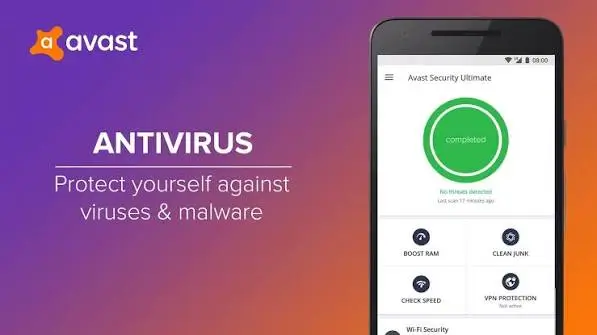
At its core, the app functions as a powerful mobile virus scanner. It utilizes cloud-based technology and real-time threat intelligence to detect and block malicious apps, spyware, and trojans. The smart scan feature quickly checks your installed apps and files for known threats, while the deep scan provides a more thorough examination of your device’s storage.
2. Anti-Theft and Device Tracking
Losing your phone is a stressful experience, but Avast’s anti-theft features can help you recover it or at least protect your data. If your device goes missing, you can remotely locate it on a map, trigger a loud alarm (even if the phone is on silent), lock the screen, or completely wipe your data to prevent unauthorized access.
3. App Lock and Privacy Protection
Privacy is a major concern for modern smartphone users. The App Lock feature allows you to secure sensitive applications—such as banking apps, photo galleries, and messaging platforms—behind a PIN, pattern, or biometric authentication. Additionally, the Privacy Advisor shows you exactly which apps have access to your sensitive permissions, giving you full control over your digital footprint.
4. Wi-Fi Security and Web Protection
Public Wi-Fi networks are notorious for security vulnerabilities. Avast includes a Wi-Fi Security scanner that checks your network for vulnerabilities and warns you if your connection is compromised. Furthermore, the web protection feature blocks malicious websites and phishing links before they can load in your browser, keeping your personal data safe from cybercriminals.
5. RAM Booster and Junk Cleaner
Beyond security, the app includes utility tools to keep your phone running smoothly. The Junk Cleaner identifies and deletes residual files, obsolete APKs, and cache data to free up storage space. Meanwhile, the RAM Booster closes background processes that are draining your battery and slowing down your device, ensuring optimal performance.
Performance and User Experience
A common concern with antivirus apps for Android is their impact on battery life and system resources. Fortunately, Avast Mobile Security is highly optimized. During standard use, the background scanning processes are lightweight and do not cause noticeable battery drain or device lag.
The user interface (UI) is clean, intuitive, and easy to navigate. The dashboard provides a clear overview of your device’s security status, and toggling features on or off requires just a few taps. The onboarding process is straightforward, making it accessible even for non-tech-savvy users.
Free vs. Avast Mobile Security Premium
Avast operates on a freemium model. While the free version is highly capable, the Avast Premium subscription unlocks advanced features for power users.
What you get in the Free Version:
- Real-time malware scanning
- Basic anti-theft features
- Wi-Fi security check
- App lock
- Junk cleaner and RAM booster
What you get in the Premium Version:
- Advanced anti-theft (including camera trap to snap a photo of the thief)
- Ad-blocking within apps and browsers
- Premium customer support
- Removal of in-app advertisements
- Advanced privacy and permission management tools
Is Premium worth it? If you frequently use public Wi-Fi, travel often, or want an ad-free experience with top-tier anti-theft capabilities, the Premium upgrade is a worthwhile investment. However, for basic everyday protection, the free version is more than sufficient.
Pros and Cons of Avast Mobile Security
To give you a quick summary, here are the main advantages and disadvantages of the app.
Pros:
- Excellent Malware Detection: High success rate in identifying and neutralizing mobile threats.
- Comprehensive Feature Set: Combines security, privacy, and device optimization in one app.
- User-Friendly Interface: Clean design and easy navigation.
- Effective Anti-Theft Tools: Reliable remote locking, wiping, and tracking capabilities.
- Lightweight Performance: Minimal impact on battery life and device speed.
Cons:
- In-App Ads in Free Version: The free tier includes advertisements that can be slightly intrusive.
- Premium Paywall: Some of the most useful features, like advanced anti-theft and ad-blocking, require a paid subscription.
- Occasional False Positives: Like many antivirus apps, it may occasionally flag safe, lesser-known apps as potential threats.
Final Verdict: Should You Download Avast Mobile Security?
After a thorough evaluation, Avast Mobile Security proves to be a top-tier mobile security app for Android users. It successfully balances robust cybersecurity features with handy device optimization tools. While the free version is excellent for basic protection, upgrading to Premium is highly recommended for those who want an ad-free experience and advanced anti-theft capabilities.
If you are looking for a reliable, feature-rich, and easy-to-use Android antivirus to safeguard your digital life, Avast Mobile Security is undoubtedly a strong contender that deserves a spot on your smartphone.
Frequently Asked Questions (FAQ)
Is Avast Mobile Security safe to use? Yes, Avast Mobile Security is a legitimate and highly rated application developed by a reputable cybersecurity company. It is designed to protect your device without compromising your privacy.
Does Avast Mobile Security drain the battery? No. The app is optimized to run efficiently in the background. While active scanning might use a small amount of power, it does not cause significant battery drain during normal daily use.
Can Avast Mobile Security remove viruses from my phone? Yes. The app features a powerful malware scanner that can detect, quarantine, and completely remove viruses, trojans, and spyware from your Android device.
Is the free version of Avast enough for basic protection? Absolutely. The free version includes real-time malware scanning, app locking, and basic anti-theft features, which are more than enough to protect the average smartphone user.
Download from Google Play for Android:
Download for Android, click here
Download from App Store for iPhone:
Download for iPhone, click here