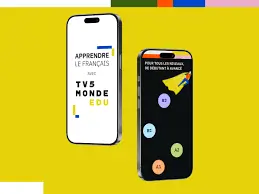
Learning a new language requires more than just memorizing vocabulary; it demands immersion in real-world contexts. The TV5MONDE EDU: Learn app stands out as a premier digital tool for French learners, leveraging authentic media to bridge the gap between textbook theory and practical fluency. Designed for Android and iOS users, this application transforms current events, culture, and entertainment into structured educational experiences. This comprehensive review explores how the app functions, its key features, and why it remains an essential resource for students and self-learners aiming to improve their French proficiency.
What Is TV5MONDE EDU: Learn?
TV5MONDE EDU: Learn is a free educational application developed by the global French-language television network TV5MONDE. Unlike generic language learning platforms that rely on synthetic dialogues, this app utilizes actual video clips from news broadcasts, documentaries, movies, and web series. The content is curated and adapted specifically for language acquisition, making it suitable for learners ranging from absolute beginners (A1) to advanced speakers (C2). Available on both Android and iPhone, the app serves as a portable classroom that aligns with the Common European Framework of Reference for Languages (CEFR), ensuring structured and measurable progress.
Key Features for Effective Language Acquisition
Authentic Video-Based Learning
The core strength of the app lies in its vast library of authentic video content. Users can watch short clips covering diverse topics such as politics, gastronomy, travel, technology, and arts. Each video comes with interactive subtitles and transcripts, allowing learners to connect spoken sounds with written text instantly. This method improves listening comprehension and exposes users to various accents, speeds, and registers of French that are rarely found in traditional courses.
Adaptive Difficulty Levels
Navigating foreign media can be overwhelming, but TV5MONDE EDU solves this through intelligent filtering. Content is categorized by CEFR levels, enabling users to select materials appropriate for their current skills. Beginners can start with slow-paced, visually supported clips, while advanced learners can challenge themselves with rapid news debates or complex cultural analyses. This adaptability ensures that the learning curve remains manageable and motivating across all stages of development.
Interactive Exercises and Quizzes
Passive watching is transformed into active learning through integrated exercises. After viewing a clip, users engage with multiple-choice questions, fill-in-the-blank activities, and vocabulary matching games tailored to the specific video. These exercises reinforce grammar points, idiomatic expressions, and cultural nuances introduced in the content. Immediate feedback helps learners identify gaps in understanding and retain information more effectively than rote memorization alone.
Offline Access and Personalized Progress Tracking
Recognizing that consistent practice often happens on the go, the app allows users to download videos and exercises for offline use. This feature is invaluable for commuters or travelers with limited internet connectivity. Additionally, the app tracks user progress, highlighting completed lessons and suggesting new content based on past performance. This personalized approach keeps learners engaged and provides a clear roadmap for advancement.
User Experience on Android and iOS
The interface of TV5MONDE EDU is clean, intuitive, and optimized for mobile screens. Navigation is seamless, with clear categorization by theme, level, and format. The video player supports adjustable playback speeds and subtitle customization, accommodating different learning preferences. Both the Android and iOS versions maintain high stability and regular updates, ensuring compatibility with the latest operating systems. The absence of intrusive ads creates a focused learning environment, distinguishing it from many free alternatives that disrupt study sessions with commercial breaks.
Who Should Use This App?
This applicationTV5MONDE EDU is ideal for a wide spectrum of users. High school and university students can supplement their coursework with real-world examples. Self-taught learners seeking immersion without traveling will find the authentic content indispensable. Teachers can also utilize the app as a resource for classroom activities or homework assignments. Furthermore, professionals needing to maintain or improve their French for career purposes benefit from the business and current affairs segments. However, complete novices with zero exposure to French may need to pair this app with a foundational course before diving into authentic media.
Pros and Cons Overview: TV5MONDE EDU
Advantages:
- Completely free access to premium educational content
- Real-world French with diverse accents and cultural context
- Structured progression aligned with international standards
- Offline functionality for flexible learning
- Ad-free experience focused purely on education
Limitations:
- Limited speaking practice or pronunciation feedback compared to AI-driven apps
- Content primarily reflects Francophone media perspectives
- Interface available mainly in French, which may confuse absolute beginners
- Exercise variety is functional but less gamified than commercial competitors
Final Verdict: TV5MONDE EDU
TV5MONDE EDU: Learn represents one of the most effective free resources for serious French learners. By combining authentic media with pedagogical structure, it addresses the critical need for contextualized input that textbooks cannot provide. While it may not replace comprehensive courses for total beginners or offer extensive speaking practice, it excels as a supplementary tool for developing listening skills, cultural competence, and vocabulary retention. For anyone committed to achieving genuine fluency, downloading this app on Android or iOS is a strategic step toward mastering the French language through real-world engagement.
Download from Google Play for Android:
Download for Android, click here
Download from App Store for iPhone:
Download for iPhone, click here