

Introduction
If you’ve ever dreamed of constructing your own fantasy world without limits, restrictions, or complicated mechanics, Pocket Build might just be the perfect mobile game for you. This charming sandbox building app has captured the hearts of millions of players worldwide by offering a delightfully simple yet endlessly creative experience. Whether you’re a casual gamer looking for a relaxing escape or a dedicated builder seeking a digital canvas, Pocket Build delivers a unique experience that stands apart in the crowded mobile gaming landscape.
In this comprehensive Pocket Build review, we’ll dive deep into every aspect of the game—from gameplay mechanics and graphics to performance and overall value—so you can decide whether this pocket-sized world builder deserves a spot on your phone.
What Is Pocket Build?
The Concept Behind the Game
Pocket Build is a freeform sandbox building game available on both iOS and Android devices. Unlike traditional city builders or strategy games, there are no missions, no enemies, no resource management, and no timers. The entire premise revolves around one idea: build whatever you want, wherever you want, however you want.
Players are dropped into an open, procedurally generated landscape and given access to hundreds of items—trees, houses, castles, fences, animals, characters, and decorative objects—to place freely across the terrain. Think of it as a digital toy box meets a zen garden.
Who Developed Pocket Build?
The game was created by MoonBear Studios, a small indie development team that focused on delivering a polished, ad-light experience in a market often dominated by aggressive monetization. Their design philosophy clearly prioritizes creativity and relaxation over competition and pressure.
Gameplay and Features
Core Building Mechanics
The gameplay in Pocket Build is refreshingly intuitive. You simply tap to select an item from the categorized menu, then tap anywhere on the landscape to place it. You can rotate objects, resize them, and even modify the terrain itself by raising or lowering land, adding water, or creating hills and valleys.
There’s no grid system forcing your hand. Every object snaps naturally into the environment, making even random placements look aesthetically pleasing. This design choice lowers the barrier to entry and ensures that even players with zero artistic skill can create visually appealing scenes.
Item Variety and Categories
One of the strongest selling points of Pocket Build is its massive library of buildable items. The categories include:
- Nature elements: Trees, flowers, rocks, bushes, and seasonal decorations
- Structures: Houses, castles, towers, bridges, and walls
- Characters and animals: Villagers, knights, horses, birds, and fantasy creatures
- Terrain tools: Water, sand, snow, lava, and elevation modifiers
- Decorative objects: Fences, lamps, carts, market stalls, and signage
- Fantasy and sci-fi items: Portals, crystals, and futuristic structures
With over 500+ unique items to unlock and place, the creative possibilities feel nearly limitless.
World Customization
Beyond placing objects, players can reshape the entire world. You can:
- Change the time of day (sunrise, noon, sunset, night)
- Adjust weather effects
- Modify terrain height and texture
- Add rivers, lakes, and oceans
- Switch between different biome themes (medieval, desert, snowy, tropical)
This level of environmental control transforms Pocket Build from a simple placement game into a genuine world-crafting tool.
Save and Share Features
Players can save multiple worlds and return to them anytime. The game also allows you to share your creations via screenshots or screen recordings, making it easy to showcase your builds on social media. While there isn’t a robust in-game community hub, the sharing functionality encourages creativity and inspiration among players.
Graphics and Visual Design
Art Style
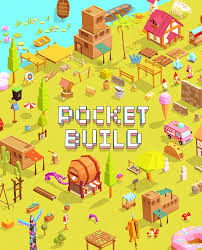
Pocket Build adopts a low-poly, pastel-colored art style that gives the game a warm, storybook-like aesthetic. The visuals are clean, soft, and incredibly pleasing to the eye. Every object is designed with rounded edges and gentle color palettes, creating a cohesive look regardless of what you place in your world.
This artistic direction is intentional—it ensures that no matter how chaotic your building session gets, the final result always looks harmonious and charming.
Animation and Details
Despite the simple art style, the game includes subtle animations that bring worlds to life. Water ripples gently, trees sway in the breeze, characters walk around aimlessly, birds fly overhead, and smoke rises from chimneys. These small touches add a layer of liveliness that elevates the experience beyond a static diorama.
Performance Across Devices
Pocket Build is well-optimized for a wide range of devices. On modern smartphones and tablets, the game runs smoothly at consistent frame rates even with hundreds of objects placed. On older or budget devices, you may notice slight frame drops when the screen is densely populated, but the experience remains largely enjoyable.
User Interface and Controls
Simplicity at Its Core
The interface is minimal and uncluttered. The item menu is organized into clear categories with intuitive icons. A small toolbar at the bottom provides access to essential tools like undo, delete, rotate, and terrain editing. There’s no tutorial overload—the game trusts you to explore and learn naturally.
Touch Controls
The touch controls are responsive and well-suited for mobile play. Placing, dragging, and rotating objects feels natural. Pinch-to-zoom and two-finger rotation for camera control work seamlessly. The game also supports landscape mode, which provides a wider canvas for building.
Monetization and In-App Purchases

Is Pocket Build Free?
Yes, Pocket Build is free to download and play. The base game includes a generous selection of items and features that can keep you entertained for hours without spending a dime.
Premium Content
The game offers optional in-app purchases that unlock additional item packs, exclusive decorations, and expanded terrain options. There is also a premium unlock that removes any remaining ads and grants access to the full item library.
Importantly, the monetization model is non-intrusive. There are no energy systems, no pay-to-win mechanics, and no aggressive pop-ups. The purchases feel like optional enhancements rather than necessary progressions, which is a breath of fresh air in today’s mobile gaming market.
Ad Experience
The free version includes occasional ads, typically displayed between sessions or when accessing certain bonus items. However, they are far less frequent and disruptive than what you’d find in most free mobile games. For a completely ad-free experience, the one-time premium unlock is reasonably priced.
Pros and Cons
What Pocket Build Does Right
- No pressure, no goals: Pure creative freedom without timers or fail states
- Massive item library: Over 500 objects across diverse categories
- Beautiful low-poly art style: Visually cohesive and calming
- Intuitive controls: Easy to learn, satisfying to use
- Offline play: No internet connection required
- Family-friendly: Suitable for all ages
- Lightweight: Doesn’t consume excessive storage or battery
- Fair monetization: No predatory mechanics
Where It Could Improve
- No multiplayer or collaborative building: It’s a strictly solo experience
- Limited depth for hardcore gamers: The lack of challenges or objectives may feel too passive for some
- No in-game community gallery: Sharing is limited to external platforms
- Occasional repetition: After extended sessions, the gameplay loop can feel one-note
- No story or narrative element: Purely sandbox with no guiding thread
Who Should Play Pocket Build?
Perfect For:
- Casual gamers seeking a stress-free creative outlet
- Fans of sandbox and building games like Minecraft (creative mode), Terraria, or Townscaper
- Parents looking for safe, non-violent games for children
- Digital artists and worldbuilders who want a quick sketching tool
- Anyone who enjoys relaxing, meditative gameplay experiences
Might Not Be For:
- Players who need objectives, missions, or progression systems
- Competitive gamers looking for multiplayer interaction
- Those who prefer complex simulation or strategy mechanics
Pocket Build vs. Similar Games
When compared to titles like Minecraft Creative Mode, Pocket Build is far simpler and more accessible but lacks the depth of block-by-block construction. Compared to Townscaper, it offers more item variety but less procedural architectural generation. Against The Sims FreePlay, Pocket Build removes life simulation entirely in favor of pure environmental design.
Its closest identity is a mobile-native, zen building toy—a category it largely owns.
Tips for Getting the Most Out of Pocket Build
- Start with terrain: Shape your land before placing objects to create natural-looking landscapes.
- Use layers: Combine trees, rocks, and small decorations to add depth to your scenes.
- Experiment with lighting: Switch between day and night to see how your world transforms.
- Create themed zones: Build a medieval village in one area and a fantasy forest in another.
- Take screenshots frequently: Track your progress and share your best creations for inspiration.
Final Verdict
Rating: 8.5 / 10
Pocket Build is a beautifully crafted, endlessly creative sandbox game that respects your time and intelligence. It doesn’t try to be everything—it simply aims to be a joyful, pressure-free space where your imagination is the only limit. The art style is gorgeous, the controls are smooth, the item variety is impressive, and the monetization is refreshingly fair.
While it may lack the depth to hold hardcore gamers for hundreds of hours, it excels as a relaxing creative companion, a quick burst of artistic expression during a lunch break, or a calming wind-down activity before bed.
If you’re searching for a mobile building game that prioritizes creativity over competition, Pocket Build is an outstanding choice that deserves a place on your home screen.
Conclusion
In a mobile gaming ecosystem saturated with battle passes, energy timers, and aggressive monetization, Pocket Build stands as a gentle reminder that games can simply be fun, peaceful, and creative. It strips away every unnecessary complication and hands you a world to shape with nothing but your imagination.
Whether you build a sprawling medieval kingdom, a cozy cottage by the lake, or an abstract fantasy dreamscape, Pocket Build gives you the tools and the freedom to make it happen—no strings attached. Download it, place your first tree, and let your creativity take over. Your pocket-sized world awaits.
Have you tried Pocket Build? Drop into the sandbox and start creating—your imagination is the only blueprint you need.
Download from Google Play for Android:
Download for Android, click here