
Introduction
Piano Kids – Music & Songs is an entertaining educational app designed to introduce young children to the world of music, creativity, and interactive learning.
Developed by Orange Studios Games, the application combines musical instruments, nursery rhymes, educational mini-games, puzzles, drawing activities, and colorful animations in one child-friendly experience.
Unlike traditional piano applications that focus mainly on playing musical notes, Piano Kids offers a broader collection of activities designed to make learning enjoyable for toddlers and preschool children.
Children can explore different musical instruments, listen to animal sounds, discover colors and shapes, learn numbers and letters, and experiment with simple melodies.
With more than 150 educational activities, over 10 musical instruments, and more than 30 children’s songs, the app offers a variety of experiences for children who enjoy music and interactive games.
In this comprehensive review, we will explore Piano Kids’ main features, educational activities, musical instruments, graphics, usability, advantages, disadvantages, and download options for Android and iOS.
Piano Kids – App Information
- App Name: Piano Kids – Music & Songs
- Developer: Orange Studios Games
- Category: Education, Music, Kids
- Platform: Android
- Price: Free to Download
- Monetization: Advertisements and In-App Purchases
- Target Age: Children aged 2–8
- Educational Activities: More than 150
- Musical Instruments: More than 10
- Children’s Songs: More than 30
- Sounds and Images: More than 300
- Internet Requirement: Supports Offline Gameplay
- Android Availability: Google Play Store
- Official Website: https://www.orangestudiosgames.com/
What Is Piano Kids?
Piano Kids is an educational music application that helps children discover musical sounds and develop basic learning skills through interactive activities.
The application combines several educational experiences in one place, making it more than just a virtual piano.
Children can tap piano keys, experiment with different instruments, listen to melodies, and explore sounds from animals, vehicles, and everyday objects.
The app also includes activities related to mathematics, memory, logic, letters, numbers, colors, and geometric shapes.
Its colorful interface and animated characters are designed to make the learning experience accessible to young users.
The main objective is to encourage children to explore, experiment, and learn while having fun.
Main Features of Piano Kids
1. Interactive Piano Keyboard
The piano keyboard is one of the application’s main attractions.
Children can touch different keys to produce musical notes and experiment with melodies.
The simple interface allows beginners to explore music without needing previous musical knowledge.
By pressing different combinations of keys, children can discover how sounds change and begin creating their own musical sequences.
This feature provides an accessible introduction to keyboard instruments.
2. Multiple Musical Instruments
Piano Kids allows children to explore more than 10 musical instruments.
Depending on the activity, available instruments include:
- Piano
- Guitar
- Drums
- Xylophone
- Saxophone
- Flute
- Harmonica
- Harp
- Other musical instruments
Each instrument produces different sounds, helping children discover the variety of musical tones.
This feature also encourages experimentation and helps young users develop an interest in music.
3. More Than 30 Children’s Songs
The application includes more than 30 children’s songs that introduce young users to simple melodies.
Children can learn musical notes step by step through an intuitive system accompanied by animated characters.
These activities make it easier for beginners to follow melodies and understand basic musical patterns.
Listening to and playing familiar children’s songs can also make the learning process more enjoyable.
4. Educational Mini-Games
One of the strongest aspects of Piano Kids is its collection of educational mini-games.
The app offers more than 150 activities covering different learning areas.
These include:
- Counting and basic mathematics.
- Addition and subtraction.
- Letters and numbers.
- Colors and geometric shapes.
- Memory challenges.
- Logic activities.
- Puzzles.
- Size comparisons.
- Sequences and patterns.
- Parts of the human body.
This variety makes Piano Kids useful for children who enjoy exploring different activities rather than playing only one type of game.
5. Animal and Vehicle Sounds
Piano Kids includes more than 300 sounds and images covering different categories.
Children can explore sounds associated with animals, vehicles, and everyday objects.
This feature helps them connect sounds with recognizable objects and discover new vocabulary.
It also makes the application more interactive and entertaining.
6. Drawing and Coloring Activities
The application includes creative activities that allow children to draw and color.
These features provide an alternative to musical games and encourage artistic experimentation.
Children can use different colors and create simple drawings through the touchscreen interface.
Such activities add variety and help make the app more appealing to younger users.
7. Memory and Logic Games
Piano Kids also includes activities designed around memory, recognition, and logical thinking.
Children can identify objects, recognize patterns, remember information, and solve simple challenges.
These mini-games provide additional educational value beyond musical exploration.
Educational Benefits of Piano Kids
Piano Kids is designed to combine entertainment with early learning.
Its activities can provide opportunities to practice several basic skills.
Musical Awareness
Exploring instruments and melodies introduces children to different sounds, notes, and rhythms.
This can help develop an early interest in music.
Hand-Eye Coordination
Touching keys, selecting objects, and interacting with different activities encourages coordination between visual attention and finger movements.
Creativity and Imagination
Drawing, coloring, and experimenting with musical instruments give children opportunities to express themselves creatively.
Memory and Concentration
Memory challenges and educational puzzles encourage children to pay attention and remember information.
Early Learning Skills
Activities involving numbers, letters, shapes, and colors provide opportunities to practice basic educational concepts.
It is important to remember that an educational app can support learning activities, but it should not replace real-world play, interaction with parents, or structured early education.
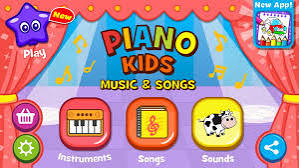
Graphics and User Interface
Piano Kids uses a colorful cartoon-inspired visual style designed to appeal to young children.
The interface includes animated characters, bright colors, recognizable objects, and simple interactive elements.
Its visual design makes it easier for children to explore different activities without needing advanced technical knowledge.
The buttons and icons are generally straightforward, allowing young users to navigate the application with minimal assistance.
The combination of animations and sounds also makes the experience more engaging.
However, younger children may still benefit from parental guidance when exploring the different sections.
Sound Quality and Music Experience
Sound is one of the most important parts of Piano Kids.
The application focuses on providing different musical tones and sound effects that children can explore through interactive activities.
The variety of instruments allows children to compare different sounds and experiment with simple melodies.
The collection of nursery rhymes also adds an enjoyable musical element.
Although the application is not intended to replace professional piano-learning software, it provides an accessible introduction to music for beginners.
Ease of Use
Piano Kids is designed with simplicity in mind.
Most activities rely on touching icons, selecting objects, pressing musical keys, and following basic on-screen instructions.
Children do not need advanced reading skills to enjoy many of the activities.
The simple navigation makes the application suitable for toddlers and preschool children.
Parents can also help younger users discover different activities and choose educational games that match their interests.
Offline Availability
One useful feature of Piano Kids is its support for offline gameplay.
After installing the application and making the required resources available, children can enjoy supported activities without a continuous internet connection.
This is particularly useful when travelling or when an internet connection is unavailable.
However, certain features, advertisements, purchases, or updates may require connectivity.
Is Piano Kids Free?
Yes. Piano Kids – Music & Songs is free to download on Android.
However, the Google Play listing indicates that the application contains advertisements and optional in-app purchases.
Parents should be aware of these features before allowing young children to use the app independently.
It is recommended to supervise children and use available device-level parental controls to manage purchases and screen time.
Performance and Compatibility
Piano Kids is designed to work on compatible Android smartphones and tablets.
Its relatively simple graphics make it accessible to many devices.
The actual experience depends on the device’s operating system, available memory, screen size, and performance.
Tablets can provide a more comfortable experience because they offer a larger display for interacting with musical keys and educational activities.
Keeping the application updated can also help improve compatibility and stability.
Advantages and Disadvantages
Pros
- More than 150 educational activities.
- More than 10 musical instruments.
- More than 30 children’s songs.
- More than 300 sounds and images.
- Simple and colorful interface.
- Interactive piano and musical activities.
- Drawing and coloring features.
- Educational puzzles and memory games.
- Activities covering letters, numbers, shapes, and colors.
- Supports offline gameplay.
- Suitable for toddlers and preschool children.
- Free to download.
Cons
- Advertisements may interrupt the experience.
- Optional purchases are available.
- Some activities may become repetitive over time.
- Younger children may need parental supervision.
- It is not a replacement for professional music lessons.
- The variety of activities may make navigation slightly confusing for very young users.
- The Android and iOS versions are not necessarily identical.
Is Piano Kids Safe for Children?
Piano Kids is designed as a children’s educational application, but parents should still supervise its use.
The Google Play listing identifies the app as suitable for children and states that the developer is committed to following Google Play Families policies.
However, the listing also indicates that advertisements and in-app purchases are present.
Parents should therefore review the application’s settings, privacy information, and purchase options.
It is also advisable to limit screen time and encourage children to combine digital learning with physical activities and family interaction.
Piano Kids vs. Traditional Piano Learning Apps
Piano Kids and traditional piano-learning applications serve different purposes.
Piano Kids focuses on introducing young children to music through simple interactions and educational games.
Traditional piano-learning applications usually offer more structured lessons, musical notation, exercises, and progressive training programs.
| Feature | Piano Kids | Traditional Piano Apps |
|---|---|---|
| Target Audience | Young children | Beginners and advanced learners |
| Musical Instruments | Multiple instruments | Mainly piano |
| Educational Mini-Games | Yes | Depends on the app |
| Nursery Rhymes | Yes | Varies |
| Drawing Activities | Yes | Usually not included |
| Letters and Numbers | Yes | Usually not included |
| Structured Piano Lessons | Limited | More extensive |
| Ease of Use | Very easy | Varies |
Piano Kids is more suitable for introducing young children to music, while dedicated piano-learning applications are generally better for structured musical education.
Is Piano Kids Worth Downloading?
Yes. Piano Kids is worth considering for parents looking for an entertaining educational application for young children.
Its combination of musical instruments, nursery rhymes, puzzles, memory games, drawing activities, and basic learning exercises makes it more versatile than a simple virtual piano.
The large selection of activities is particularly useful for children who enjoy exploring different types of games.
However, parents should remember that the application contains advertisements and optional purchases.
Overall, Piano Kids provides a convenient way to introduce children to music and basic educational concepts through interactive play.
How to Download Piano Kids for Android and iPhone
You can download Piano Kids through the following official application stores.
Download Piano Kids for Android
The Android version reviewed in this article is developed by Orange Studios Games.
Official Google Play Download:
https://play.google.com/store/apps/details?id=com.orange.kidspiano.music.songs
Download Piano Kids for iPhone and iPad
The exact Orange Studios Games version discussed in this review does not have a verified iOS listing.
An alternative application with a similar name is available for iPhone and iPad:
Piano Kids – Baby Music Games by Amaya Soft:
https://apps.apple.com/us/app/piano-kids-baby-music-games
Please note that the iOS application is developed by Amaya Soft and has different features and content from the Android version reviewed above.
Always check the developer name and application details before downloading.
Frequently Asked Questions (FAQ)
1. What is Piano Kids?
Piano Kids is an educational application that combines musical instruments, children’s songs, puzzles, drawing, and interactive learning activities.
2. Is Piano Kids free?
Yes. The Android version is free to download, but it includes advertisements and optional in-app purchases.
3. What age group is Piano Kids designed for?
The developer recommends the application for children aged 2 to 8.
4. Can children learn piano with Piano Kids?
Yes. Children can explore piano keys, discover musical notes, and practice simple melodies. However, it is an introductory music application rather than a professional piano-learning course.
5. How many musical instruments are available?
The Android version features more than 10 musical instruments, including piano, guitar, drums, xylophone, saxophone, flute, harmonica, and harp.
6. Does Piano Kids work offline?
Yes. The application supports offline gameplay for supported activities after installation.
7. Does Piano Kids include educational games?
Yes. It offers more than 150 activities covering mathematics, letters, numbers, memory, logic, puzzles, shapes, and creativity.
8. Is Piano Kids available on iPhone?
A similarly named application is available on the Apple App Store, but the iOS version is published by Amaya Soft rather than Orange Studios Games.
9. Does Piano Kids contain advertisements?
Yes. The Orange Studios Games Android version contains advertisements and optional in-app purchases.
10. Is Piano Kids suitable for toddlers?
The application is designed for young children, including toddlers and preschoolers. Parental supervision is recommended, particularly because of advertisements and purchase options.
Final Verdict
Piano Kids – Music & Songs is a versatile educational application that combines music, creativity, and early learning in an entertaining package.
Its extensive collection of musical instruments, children’s songs, educational mini-games, and creative activities makes it an appealing choice for toddlers and preschool children.
The simple interface and colorful graphics help make the application accessible to young users, while offline support adds convenience for families.
Although advertisements and optional purchases are disadvantages, the wide variety of activities gives the application considerable educational and entertainment value.
Final Recommendation: Piano Kids is a good choice for parents who want to introduce their children to music and basic educational concepts through interactive games.
Our Rating: 8.5/10