Introduction: Is This the Best Learning App for Your Preschooler?
Finding a safe, engaging, and genuinely educational app for children aged 3 to 5 can feel overwhelming. With thousands of toddler learning games flooding app stores, parents need a trustworthy option that balances fun with real developmental value. Kids Games: For Toddlers 3-5 aims to be exactly that—a all-in-one preschool learning platform packed with mini-games designed to build early cognitive, motor, and creative skills.
In this comprehensive review, we break down every aspect of the app: gameplay quality, educational content, safety features, pricing, and whether it truly deserves a spot on your child’s tablet.
App Overview
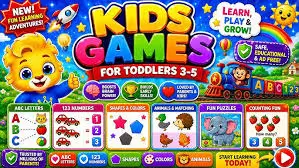
Kids Games: For Toddlers 3-5 is a collection-based educational app targeting preschoolers and early kindergarten children. Rather than offering a single game, it bundles dozens of short, interactive activities under one colorful umbrella. The app covers foundational learning areas including:
- Shape and color recognition
- Counting and basic numeracy
- Letter identification and early phonics
- Animal sounds and vocabulary
- Puzzle solving and pattern matching
- Drawing, coloring, and creative play
- Memory and logic games
The design philosophy is simple: short attention spans demand short, rewarding activities. Each mini-game lasts between 30 seconds and 2 minutes, keeping toddlers engaged without causing frustration or overstimulation.
Gameplay & Features: What Your Child Will Actually Do
Variety of Mini-Games
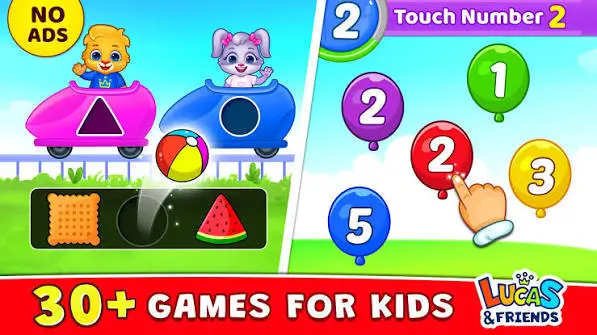
The app typically includes 20 to 40+ mini-games, depending on the version and updates. Activities range from dragging shapes into matching outlines, popping balloons with numbers, tracing letters with a finger, to simple jigsaw puzzles featuring animals, vehicles, and everyday objects.
Progressive Difficulty
One standout feature is the gentle difficulty curve. Early levels introduce single-step tasks (e.g., “tap the red circle”), while later stages combine instructions (“find the blue triangle and drag it to the box”). This scaffolding approach mirrors how preschool educators structure classroom activities.
Reward System
Children earn stars, stickers, or short celebratory animations after completing tasks. These micro-rewards maintain motivation without introducing competitive pressure or in-game currency that could confuse young users.
Offline Play
A major advantage for parents: most activities work fully offline. This makes the app ideal for car rides, flights, or areas with limited connectivity—no buffering, no ads loading mid-game.
Educational Value: Does It Actually Teach?
Cognitive Development
Pattern recognition, sorting, and memory-match games strengthen neural pathways associated with logical thinking. These align with early childhood education standards commonly referenced in preschool curricula.
Language & Vocabulary
Animal sounds, object naming, and letter-tracing activities build receptive and expressive vocabulary. For bilingual households, the clear visual-audio pairing helps children associate words with images without relying on translation.
Fine Motor Skills
Tracing, dragging, tapping, and pinching gestures develop hand-eye coordination and prepare small fingers for future writing tasks.
Creativity
Open-ended coloring and drawing modules let children experiment freely. There are no “wrong answers” in these sections, encouraging self-expression and confidence.
What It Does NOT Replace
It’s important to note: no app replaces hands-on play, reading physical books, or social interaction. Kids Games: For Toddlers 3-5 works best as a supplementary tool—a 15-to-20-minute daily screen activity alongside outdoor play, storytelling, and peer interaction.
User Interface & Design
Toddler-Friendly Navigation
The interface relies almost entirely on icons, arrows, and audio cues rather than written instructions. A 3-year-old who cannot yet read can navigate menus independently. Large tap targets reduce accidental selections, and there are no hidden links or external redirects visible to the child.
Visual Style
Bright, saturated colors with rounded, cartoon-style illustrations dominate the screen. Animations are smooth but not hyper-stimulating—there are no rapid flashing effects or chaotic movement that could overwhelm sensitive children.
Audio & Music
Background music is cheerful and low-volume. Sound effects are clear and purposeful (a “pop” for correct answers, a gentle “try again” tone for mistakes). Voice prompts are slow and enunciated, ideal for language learners.
No Clutter
Menus are minimal. There are no social media buttons, no chat features, and no community feeds—critical design choices for a 3-to-5-year-old audience.
Safety & Parental Controls
COPPA & Child Privacy Compliance
The app does not collect personal data from children. There are no sign-up requirements, no email collection, and no behavioral tracking directed at minors.
Ad Policy
In the free version, ads may appear—but they are typically restricted to interstitials shown only in the parent zone, not during active gameplay. Premium or paid versions remove ads entirely.
Parental Gate
Settings, subscriptions, and any external links are locked behind a parental gate (usually a simple math problem or a “hold for 3 seconds” prompt) that a toddler cannot bypass.
No In-App Purchases Visible to Children
Any purchase prompts exist solely in the adult section, preventing accidental buys by curious little fingers.
Pricing & Monetization Model
| Tier | What You Get |
|---|---|
| Free Version | Limited set of mini-games (usually 5–10), may include parent-zone ads |
| Premium / One-Time Unlock | Full access to all games, no ads, offline mode, regular content updates |
| Subscription (if offered) | Monthly or yearly access with new games added periodically |
For most families, the one-time premium unlock offers the best value—no recurring fees, full content library, and a completely ad-free experience for the child.
Performance & Compatibility
- Platforms: Available on Android (Play Store) and iOS (App Store)
- Device Requirements: Runs smoothly on mid-range tablets and smartphones; does not demand high-end hardware
- Storage Footprint: Moderate (typically 100–300 MB depending on content pack)
- Updates: Developers push seasonal and thematic updates (holiday-themed games, new animal packs) to keep content fresh
- Battery Impact: Low to moderate; no heavy 3D rendering or constant server pings
Pros and Cons
✅ Pros
- Wide variety of age-appropriate mini-games in a single app
- Genuine educational scaffolding aligned with preschool milestones
- Fully offline capable
- Clean, ad-free experience for the child (premium)
- Intuitive, read-free navigation for pre-literate users
- Strong parental controls and privacy safeguards
- Gentle reward system without addictive loops
- Regular content updates keep the app feeling new
❌ Cons
- Free version is quite limited; full experience requires payment
- Some mini-games may feel repetitive after several weeks for advanced 5-year-olds
- No multiplayer or social features (by design, but worth noting)
- Limited customization for parents to select specific skill areas
- Occasional minor bugs after major updates (typically patched quickly)
Who Is This App Best For?
- Parents of 3-to-5-year-olds seeking a safe, curated screen-time option
- Homeschooling families needing a supplemental digital activity for early literacy and numeracy
- Caregivers and grandparents who want a simple, no-setup app a toddler can use independently
- Families who travel often and need reliable offline entertainment
- ESL / bilingual households looking for visual-vocabulary reinforcement
Tips for Parents: Getting the Most Out of the App
- Set a timer. 15–20 minutes per session is ideal for this age group.
- Play together initially. Sit beside your child for the first few sessions to model how games work.
- Talk about what they see. “What color is that? Can you count the ducks?” turns passive tapping into active learning.
- Rotate activities. Encourage your child to try different mini-games rather than repeating one favorite.
- Use the parental zone. Adjust difficulty, track progress, and manage settings from the adult section.
Final Verdict
Kids Games: For Toddlers 3-5 delivers exactly what its name promises: a broad, safe, and genuinely educational collection of games tailored to the developmental window between ages 3 and 5. It avoids the common traps of kids’ apps—aggressive ads, manipulative reward loops, and data harvesting—while offering enough variety to hold a preschooler’s interest for weeks.
It is not a revolutionary, one-of-a-kind experience, but it is a reliable, well-executed, and parent-approved digital toolbox for early learning. If you want one app on your toddler’s tablet that you can hand over without worry, this is a strong choice.
Overall Rating: ⭐ 4.3 / 5
| Category | Score |
|---|---|
| Educational Value | 4.5 / 5 |
| Fun & Engagement | 4.5 / 5 |
| Safety & Privacy | 5 / 5 |
| Ease of Use | 4.5 / 5 |
| Value for Money | 4 / 5 |
| Long-Term Replayability | 3.5 / 5 |
Looking for a safe, screen-time-friendly app that actually teaches your toddler while they giggle and tap? Kids Games: For Toddlers 3-5 earns its place in the family app library.
Related searches parents often explore: best educational apps for 3-year-olds, free toddler learning games, safe kids apps no ads, preschool games for Android and iPad, screen time apps for kindergarteners.
Download Kids Games from Google Play for Android:
Download Kids Games for Android, click here
Download Kids Games from App Store for iPhone:
Download for iPhone, click here