When it comes to PC gaming, every frame per second (FPS) and every megabyte of RAM counts. For years, gamers have had to close their web browsers before launching heavy games to prevent lag and stuttering. Enter Opera GX, a web browser specifically built and marketed for gamers. But does it live up to the hype, or is it just a gimmick with a flashy RGB aesthetic?
In this comprehensive Opera GX review, we will dive deep into its features, performance, security, and overall user experience to help you decide if it is the right browser for your gaming rig.
What is Opera GX?
Opera GX is a specialized version of the popular Opera browser, built on the same Chromium engine that powers Google Chrome. However, instead of focusing purely on general web browsing, Opera GX is tailored specifically for the gaming community. It combines the robust extension support and rendering speed of Chromium with unique gaming-centric features, hardware resource management, and a highly customizable, gamer-focused interface.
Key Features That Make Opera GX Stand Out
1. GX Control: RAM and CPU Limiters
The standout feature of Opera GX is undoubtedly GX Control. This built-in tool allows users to set strict limits on how much RAM and CPU the browser is allowed to use.
- CPU Limiter: Prevents the browser from consuming processing power needed for your games.
- RAM Limiter: Ensures that background tabs don’t eat up your system memory, keeping your game running smoothly.
- Network Limiter: Allows you to restrict the bandwidth the browser uses, ensuring your game’s ping remains low even if a background tab is downloading an update.
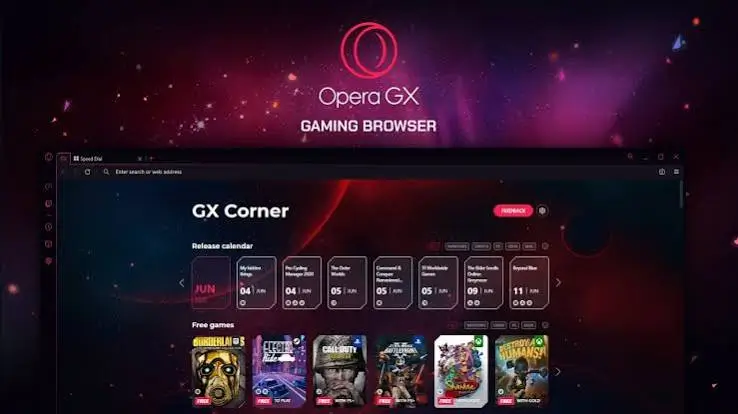
2. GX Corner: Your Personal Gaming Hub
Opera GX includes a dedicated start page called GX Corner. This acts as a centralized hub for gamers, providing:
- Real-time updates on upcoming game releases.
- Free game notifications (from platforms like Epic Games and Steam).
- The best current deals and discounts on PC games.
- A curated feed of the latest gaming news and Twitch streams.
3. Unmatched Customization and Aesthetics
Opera GX is arguably the best-looking browser on the market for those who love customization.
- RGB and Razer Chroma Integration: The browser’s lighting effects can sync with your Razer peripherals or change colors based on the game you are playing.
- Custom Sound Effects: Every click, tab open, and notification can be accompanied by custom, synthesized sound effects.
- Themes and Wallpapers: A massive library of gamer-centric themes and animated wallpapers.
4. Seamless Streaming and Messaging Integrations
For gamers who stream or chat while playing, Opera GX offers built-in sidebars for Twitch, Discord, WhatsApp, and Instagram. You can watch a Twitch stream in a pinned sidebar without ever leaving your current tab, or chat with your Discord friends without alt-tabbing out of your game.
Performance, Security, and Privacy
Under the hood, Opera GX performs just like standard Chromium browsers, meaning it is fast, reliable, and compatible with almost all Chrome Web Store extensions.
Security and Privacy:
- Built-in Ad and Tracker Blocker: Opera GX comes with a native ad blocker that stops intrusive ads and trackers, which not only improves privacy but also speeds up page loading times.
- Crypto Wallet: For Web3 gamers, there is a built-in crypto wallet for managing digital assets securely.
- Battery Saver: While mostly useful for gaming laptops, the battery saver mode significantly reduces power consumption when you are browsing on the go.
Opera GX Pros and Cons
To give you a balanced perspective, here is a quick breakdown of the advantages and disadvantages of using Opera GX.
Pros:
- Excellent Resource Management: The RAM, CPU, and Network limiters are genuinely useful for low-end PCs or multitaskers.
- Gamer-Centric UI: The aesthetics, RGB sync, and sound effects are highly polished and fun to use.
- Great Integrations: Built-in Twitch, Discord, and WhatsApp sidebars are incredibly convenient.
- GX Corner: A fantastic built-in tool for tracking game deals and releases.
- Chrome Extension Support: Full access to the massive Chrome Web Store library.
Cons:
- Can Feel Bloated: If you are not a gamer, the extra features might feel unnecessary and clutter the interface.
- Resource Heavy by Default: If you don’t actively use the limiters, the browser’s animations and background processes can consume more resources than lightweight browsers.
- Privacy Concerns: Like many free browsers, it collects some user data for analytics, which might deter strict privacy advocates.
Final Verdict: Should You Download Opera GX?
So, is Opera GX worth downloading? If you are a PC gamer who frequently multitasks, streams, or plays on a system with limited hardware resources, Opera GX is arguably the best browser you can use. The GX Control limiters genuinely help manage system resources, and the built-in Twitch and Discord integrations offer a seamless experience.
However, if you are looking for a minimalist, lightweight browser for basic web browsing and don’t care about RGB lighting or gaming news, you might find Opera GX a bit too flashy and feature-heavy.
Ultimately, Opera GX successfully bridges the gap between a high-performance web browser and a gaming utility, making it a must-try for the gaming community.
Frequently Asked Questions (FAQs)
Does Opera GX slow down my PC? No, it actually helps prevent slowdowns. Thanks to the GX Control feature, you can limit the CPU and RAM usage, ensuring the browser doesn’t interfere with your game’s performance.
Can I use Chrome extensions on Opera GX? Yes. Because Opera GX is built on the Chromium engine, it is fully compatible with extensions from the Chrome Web Store.
Is Opera GX good for everyday browsing? Yes, it is excellent for everyday browsing. It includes a built-in ad blocker, tracker blocker, and a free VPN (in supported regions), making it secure and fast for general web use.
Does Opera GX collect my data? Opera GX collects some diagnostic and usage data to improve the browser, similar to most free browsers. However, you can disable most data collection in the privacy settings.
Download Opera GX for Windows:
Download for Windows, click here