

In an era where digital privacy is paramount and browser bloatware is common, Aloha Browser for Windows has emerged as a compelling alternative to mainstream options. Originally renowned for its mobile performance, the desktop version brings a unique combination of built-in privacy tools, media capabilities, and lightweight architecture to the PC environment. This comprehensive review explores whether Aloha Browser for Windows lives up to its reputation as a secure, fast, and user-friendly web navigator in 2026.
Overview: What Is Aloha Browser for Windows?
Aloha Browser for Windows is a Chromium-based web browser designed with a “privacy-first” philosophy. Unlike traditional browsers that require numerous extensions to achieve anonymity or ad-blocking, Aloha integrates these features natively. It targets users who want a seamless browsing experience without sacrificing security or enduring intrusive advertisements. The Windows iteration maintains the core DNA of its mobile counterpart while optimizing for larger screens, keyboard shortcuts, and desktop resource management.
Key Features and Functionalities
Native Ad Blocker and Tracker Prevention
The standout feature of Aloha Browser is its robust, built-in ad blocker. It effectively eliminates pop-ups, video ads, banners, and tracking scripts without requiring third-party installations. This native integration results in faster page load times and reduced memory usage compared to Chrome or Edge loaded with multiple blocking extensions. The tracker prevention system operates silently in the background, stopping fingerprinting attempts and data collection by default.
Built-In VPN and Encryption Tools
Privacy enthusiasts appreciate the integrated VPN functionality. While the free tier offers basic encryption and location masking, it provides sufficient protection for casual browsing on public Wi-Fi networks. The browser also supports HTTPS-only mode and DNS-over-HTTPS (DoH) out of the box, ensuring that connection metadata remains encrypted even before reaching the destination server.
Media Player and Download Manager
Aloha distinguishes itself with superior media handling. The browser includes a versatile media player capable of streaming content from various sources without external codecs. Additionally, the download manager supports torrenting and magnet links directly within the browser interface, eliminating the need for separate client software. This consolidation appeals to users who prefer a minimalist software ecosystem.
Customization and User Interface
Despite its feature-rich backend, the user interface remains clean and intuitive. Users can customize themes, adjust tab layouts, and configure gesture controls. The Windows version supports vertical tabs and workspace grouping, enhancing productivity for power users who manage dozens of tabs simultaneously.
Performance and Resource Management
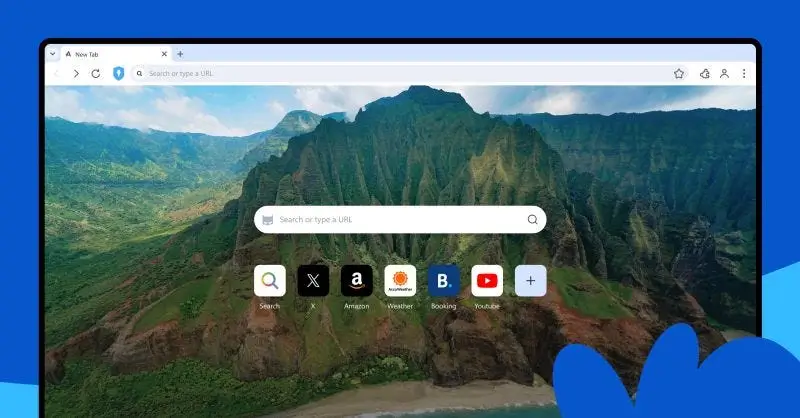
One of the most frequent criticisms of Chromium browsers is excessive RAM consumption. Aloha Browser for Windows addresses this through aggressive optimization. Benchmarks indicate lower baseline memory usage than standard Chrome installations, particularly when ad-blocking and VPN features are active. Page rendering speeds are competitive with top-tier browsers, benefiting from the pre-integrated blocking engine that prevents resource-heavy scripts from executing.
Startup times are generally swift, though enabling the VPN at launch may add marginal latency. For users on older Windows hardware, Aloha’s efficiency makes it a viable daily driver where heavier browsers might struggle.
Privacy and Security Assessment
Security is not an afterthought in Aloha Browser; it is the foundation. Beyond ad blocking and VPN, the browser offers:
- Anti-fingerprinting protection: Masks browser characteristics to prevent identification.
- Secure DNS: Prevents ISP-level snooping and DNS hijacking.
- No telemetry policy: Unlike many free browsers, Aloha claims minimal data collection, focusing on essential operational metrics only.
- Regular security updates: As a Chromium fork, it inherits timely security patches from the upstream project.
For users transitioning from browsers with questionable privacy practices, Aloha provides immediate peace of mind without complex configuration.
Pros and Cons
Advantages
- Zero-setup privacy with native ad blocking and anti-tracking.
- Integrated VPN and torrent support reduce software clutter.
- Lower RAM footprint compared to vanilla Chromium browsers.
- Clean, modern UI with useful customization options.
- Free core functionality with optional premium upgrades.
Limitations
- Extension library is limited compared to Chrome Web Store compatibility.
- Free VPN has bandwidth and server location restrictions.
- Smaller community means fewer troubleshooting resources online.
- Occasional compatibility issues with niche enterprise web applications.
- Sync ecosystem is less mature than Google or Microsoft alternatives.
Who Should Use Aloha Browser for Windows?
Aloha Browser for Windows is ideal for:
- Privacy-conscious users who want protection without technical setup.
- Media consumers seeking integrated streaming and downloading tools.
- Users with modest hardware needing a lightweight Chromium alternative.
- Minimalists preferring fewer installed applications.
It may be less suitable for developers heavily reliant on specific Chrome extensions or enterprise users dependent on deep Microsoft/Google ecosystem integration.
Final Verdict
Aloha Browser for Windows successfully translates its mobile success to the desktop platform. It fills a genuine gap between bare-bones privacy browsers and feature-heavy mainstream options. By bundling essential privacy and media tools natively, it delivers a streamlined experience that respects both user time and system resources.
While it cannot fully replace Chrome for every use case due to extension limitations, it stands as an excellent primary or secondary browser for those prioritizing speed, privacy, and simplicity. In 2026, as web tracking grows more sophisticated, Aloha’s integrated approach represents a pragmatic evolution in desktop browsing.
Frequently Asked Questions
Is Aloha Browser for Windows free?
Yes, the core browser with ad blocking and basic privacy features is completely free. Premium plans unlock unlimited VPN, advanced media features, and priority support.
Does Aloha Browser support Chrome extensions?
Partial support exists, but compatibility is not guaranteed. The browser prioritizes native functionality over extension ecosystem breadth.
How does Aloha compare to Brave Browser?
Both offer native ad blocking and privacy features. Aloha differentiates with integrated media/torrent tools and a different VPN implementation. Brave has broader extension compatibility and a more established desktop presence.
Can I use Aloha Browser as my default Windows browser?
Absolutely. Many users adopt it as their primary browser, especially those valuing privacy and media capabilities over extensive extension libraries.
Does the built-in VPN slow down browsing?
When enabled, any VPN introduces some latency. However, Aloha’s optimized routing minimizes impact for general browsing. Users can toggle VPN per-site or disable it entirely for maximum speed.
Download Aloha Browser for Windows:
Download for Windows, click here
Download Aloha Browser for MacOS:
Download for MacOS, click here