

Introduction: A Trip Down Memory Lane
Remember the electric buzz of neon-lit arcades, the satisfying clink of coins dropping into slots, and the pure adrenaline of chasing a high score? For millions of gamers, those memories define an era. Arcade Simulator: Retro Games promises to resurrect that golden age of gaming and deliver it straight to your smartphone or tablet. But does this retro gaming app truly capture the magic of the original cabinet experience, or does it fall flat like a pixelated sprite?
In this comprehensive Arcade Simulator: Retro Games review, we dive deep into every aspect of the app—from gameplay mechanics and visual fidelity to performance, controls, and overall value. Whether you are a seasoned retro enthusiast or a curious newcomer eager to explore classic arcade titles, this guide will help you decide if the download is worth your time.
What Is Arcade Simulator: Retro Games?
Arcade Simulator: Retro Games is a mobile gaming application that bundles a curated collection of classic-style arcade titles into a single, easy-to-navigate platform. The app replicates the look, feel, and mechanical simplicity of vintage arcade cabinets while leveraging modern touchscreen technology.
Rather than relying on a single game, the simulator offers a library of mini-games spanning multiple genres—shoot-em-ups, brick breakers, space invaders, racing challenges, and puzzle. Each title is designed to evoke the aesthetic and gameplay loops of the 1970s and 1980s arcade scene, wrapped in a modern interface that keeps things accessible for today’s players.
Key Features That Set It Apart
A Diverse Library of Classic-Style Games
The standout selling point of Arcade Simulator: Retro Games is variety. Players can jump between a space shooter, a pong-style rally, and a maze-chase adventure within seconds. Each game is self-contained with its own scoring system, difficulty progression, and unlockable content, ensuring that boredom rarely sets in.
Authentic Retro Aesthetics
From CRT-style screen filters to chunky pixel art and chiptune soundtracks, the app commits fully to the retro theme. The developers have included optional scanline overlays and bezel frames that mimic the physical look of old arcade monitors, adding a layer of immersion that many competing retro gaming apps simply ignore.
Leaderboards and High-Score Challenges
Competition is the lifeblood of arcade gaming, and this app understands that. Global and friend-based leaderboards track your best scores across every title. Weekly challenges and rotating score events give players recurring reasons to return and push their limits.
Offline Play and Low Storage Footprint
One of the most practical advantages is that Arcade Simulator: Retro Games supports full offline play. There is no mandatory internet connection, no heavy downloads, and no waiting for servers. The entire package occupies a modest amount of storage, making it ideal for devices with limited space.
Customizable Controls
The app offers multiple control schemes, including virtual joystick, tap zones, and swipe gestures. Players can adjust button size, opacity, and placement to suit their hand size and grip style—a thoughtful touch that dramatically improves comfort during long sessions.
Gameplay Experience: Does It Feel Like the Real Deal?

The core question any retro gaming fan asks is simple: Does it feel authentic? The answer, for the most part, is a resounding yes.
Each title inside Arcade Simulator: Retro Games follows the “easy to learn, hard to master” philosophy that defined the original coin-op era. Rounds are short, difficulty ramps up organically, and the reward loop is tightly tuned. You die, you restart, you try one more time—just like feeding another quarter into the machine.
That said, the pacing is intentionally snappy. There are no lengthy tutorials, no narrative cutscenes, and no microtransaction paywalls interrupting the flow. The experience is stripped down to pure gameplay, which is exactly what retro purists want.
Difficulty Curve and Replayability
Early levels are forgiving, allowing newcomers to build confidence. However, the difficulty spikes noticeably after the first few stages, demanding precise timing and pattern recognition. This steep curve gives experienced players a genuine sense of accomplishment and fuels replayability for weeks.
Graphics and Sound Design
Visual Presentation
The pixel art is clean, colorful, and intentionally low-resolution to honor the 8-bit and 16-bit eras. Animations are smooth despite the retro constraint, and the optional CRT filter modes add warmth and nostalgia without sacrificing readability on modern high-DPI screens.
Audio and Music
The sound design deserves special praise. Chiptune tracks loop with catchy melodies that never become grating, while sound effects—explosions, coin pickups, power-up chimes—are crisp and satisfying. The audio mix stays balanced even during chaotic on-screen action, and players can independently adjust music and SFX volume levels.
User Interface and Navigation
The main menu is styled to resemble a physical arcade lobby, complete with neon signage and cabinet thumbnails. Switching between games takes one tap. Settings are logically grouped, and there is zero clutter.
Ads, when present, appear between game sessions rather than mid-gameplay, which preserves the flow. A premium unlock removes advertisements entirely, though the free experience remains fully functional.
Pros and Cons at a Glance
Pros
- Wide variety of retro-inspired mini-games in one app
- Authentic pixel-art visuals with CRT filter options
- Intuitive, customizable touch controls
- Fully playable offline
- Global leaderboards and weekly challenges
- Lightweight storage requirements
- No pay-to-win mechanics
Cons
- Some titles feel slightly repetitive after extended play
- Occasional minor frame drops on older devices during particle-heavy scenes
- Limited multiplayer options (mostly asynchronous leaderboards)
- A few users may wish for more game genres in future updates
Performance and Device Compatibility
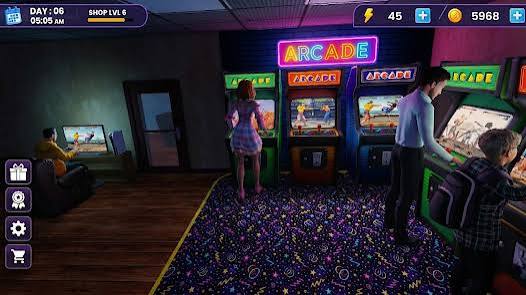
Arcade Simulator: Retro Games runs smoothly on most mid-range Android and iOS devices. The app targets a stable 60 FPS under normal conditions and handles transitions between games without noticeable loading times. On budget or aging hardware, dropping the CRT filter and particle effects to “Low” in the settings menu resolves virtually all performance hiccups.
The app requires a relatively recent OS version but does not demand flagship specifications, broadening its accessibility.
Who Should Play Arcade Simulator: Retro Games?
This app is tailor-made for:
- Nostalgic gamers who grew up with coin-op cabinets and want that feeling in their pocket.
- Casual players looking for quick, satisfying sessions during commutes or breaks.
- Retro-culture enthusiasts who appreciate pixel art, chiptune music, and minimalist design.
- Parents seeking simple, ad-light games to share with younger family members.
- Score chasers who thrive on climbing leaderboards and beating personal bests.
If you prefer deep narrative campaigns, open-world exploration, or cutting-edge 3D graphics, this title will not be your go-to. But for pure, unfiltered arcade fun, it hits the mark.
Tips to Get the Most Out of the App
- Experiment with control layouts before diving into hard stages; the right configuration can shave seconds off reaction time.
- Enable the CRT filter for maximum nostalgia, but disable it if you notice frame drops.
- Focus on one genre at a time to learn enemy patterns and scoring multipliers.
- Check weekly challenges regularly—they often introduce temporary rule twists that keep familiar games feeling fresh.
- Use headphones to fully appreciate the chiptune soundtrack and directional audio cues.
Final Verdict: Is Arcade Simulator: Retro Games Worth Downloading?
Arcade Simulator: Retro Games succeeds where many retro compilations stumble: it respects the source material while embracing the convenience of mobile hardware. The game library is diverse enough to prevent monotony, the presentation drips with nostalgic charm, and the control system is flexible enough for any play style.
It is not a revolutionary reinvention of arcade gaming, nor does it pretend to be. Instead, it delivers a polished, ad-light, offline-friendly collection of classic-style games that you can enjoy anytime, anywhere. The leaderboard system adds just enough competitive spice to keep you coming back for “one more round.”
Rating: 8.5 / 10
If you have ever felt the pull of a glowing arcade cabinet or simply want a reliable pocket-sized escape into simpler gaming times, Arcade Simulator: Retro Games earns a permanent spot on your home screen. Insert your virtual coin, press start, and let the pixels do the rest.
Thank you for reading this Arcade Simulator: Retro Games review. Drop a high score, share it with a friend, and keep the retro spirit alive.
Download Arcade Simulator from Google Play for Android:
Download for Android, click here